Shopping for an AI phone answering system can feel overwhelming. Every provider claims to be the best. Every demo looks polished. And every sales pitch sounds convincing.
So when business owners are asked what they’re comparing, the answer is usually the same:
“I’m not sure yet.”
That’s not your fault.
The AI answering service space is still evolving, and most companies don’t make it easy to compare real capabilities. This is especially true when it comes to reliability, support, and long-term performance.
The result? Many businesses choose based on the best pitch, not the best fit.
This guide changes that.Below are the 10 most important questions to ask before choosing an AI phone answering system, including what good answers look like and the red flags to avoid.
1. How Is My Data Stored and Who Has Access?
Why This Matters
An AI phone answering system processes sensitive information every day: customer names, phone numbers, and sometimes private business details.
According to IBM’s 2023 Cost of a Data Breach Report, the average data breach costs businesses $4.45 million. Security is extremely important for AI services.
What Good Looks Like
- Data encryption: Your data should be encrypted both when it’s stored and when it’s being transmitted. Ask if they use industry-standard encryption methods.
- Access controls: The provider should have role-based access controls that limit who can view your data internally.
- Data location: You should know which country or region your data is stored in, especially if you have regulatory requirements.
- Third-party sharing: There should be a clear, written policy that your data is not shared with or sold to third parties.
Red Flags to Watch For
- Vague answers like “we take security seriously”
- No documentation or specifics
2. What Happens When the AI Can’t Handle a Call?
Why This Matters
No AI answering service is perfect.
Your system will encounter:
- Complex or confusing requests
- Emotional or upset callers
- Situations that require human judgment
How the service handles these moments determines whether your customers have a good experience or a frustrating one.
What Good Looks Like
- Clear escalation paths: The AI should be able to transfer calls to a human when needed, whether that’s your staff, an on-call person, or the provider’s live receptionist team.
- Customizable triggers: You should be able to define what situations require human intervention. For example: emergencies, VIP clients, or specific topics.
- Warm transfers: The AI should provide context to the human taking over, not just dump the call. The person should know why the caller is being transferred and what’s already been discussed.
- Fallback options: If no human is available, there should be clear protocols: take a detailed message, schedule a callback, or route to voicemail with proper follow-up.
Red Flags to Watch For
- Claims that the “AI handles everything” without acknowledging limitations
- No clear process for human escalation
If I Need Help, Can I Reach a Human?
Why This Matters
This isn’t about your callers – it’s about you.
When something breaks, you need to know you can talk to a real person. But, many AI-first companies have eliminated human support entirely, leaving you stuck in chatbot loops when you need real help.
What Good Looks Like
- Multiple support channels: Phone, email, and chat options. Not just a knowledge base or AI chatbot.
- Reasonable response times: Clear expectations for how quickly you’ll hear back. For urgent issues, same-day response should be standard.
- Dedicated account support: Access to someone who knows your account and your business, not just a random support agent each time.
- US-based support: If you’re a US business, having support in the same time zone and without language barriers matters for quick resolution.
- Human escalation path: If you’re interacting with their AI support, there should always be a clear option to reach a human when needed.
Red Flags to Watch For
- Email-only support
- Chatbots with no human escalation option
- Support hours that don’t align with your business hours
- Vague response time promises
4. Can I Customize Call Handling for My Business?
Why This Matters
Your business isn’t generic, and your call handling shouldn’t be either.
A law firm, HVAC company, and medical office all require completely different workflows.
What Good Looks Like
- Custom scripts: You should be able to define exactly how the AI greets callers, what questions it asks, and how it responds to common inquiries.
- Industry-specific workflows: For example, legal intake that captures case type, accident date, and insurance information. Or HVAC intake that asks about equipment type and symptoms.
- Adjustable business rules: Set different handling for different times of day, caller types, or urgency levels.
- Easy updates: You should be able to change your scripts and instructions without waiting for support or paying extra fees.
Red Flags to Watch For
- One-size-fits-all scripts with minimal customization
- Customization that requires expensive professional services
5. Does It Integrate With My Existing Tools?
Why This Matters
An AI phone answering system that doesn’t connect to your calendar, CRM, or scheduling software creates more work, not less. You’ll end up manually transferring information, which defeats the purpose.
What Good Looks Like
Ask about integrations with:
- Calendar systems: Google Calendar, Outlook, Calendly, or industry-specific schedulers.
- CRM platforms: Salesforce, HubSpot, Zoho, or practice management software.
- Communication tools: Ability to send appointment confirmations via SMS or email.
- Industry-specific software: Legal practice management, healthcare EHRs, home service dispatch systems.
The provider should clearly explain whether integrations are native (built-in), via API, or through third-party connectors.
Red Flags to Watch For
- Limited integrations or vague answers like “we can integrate with anything” without specifics
- Expensive add-on packages for integration capabilities
6. What Will It Cost, and What’s My Commitment?
Why This Matters
Pricing transparency is a major issue in the AI receptionist service industry. Some providers advertise low base rates but charge per-minute overages, setup fees, or extra for basic features. And getting locked into a long-term contract with a service that doesn’t meet your needs is frustrating and expensive.
What Good Looks Like
- Base cost: Monthly fee and what’s included.
- Usage limits: Number of calls, minutes, or conversations included.
- Overage rates: What happens if you exceed limits, and how much extra calls cost.
- Setup fees: Any one-time charges for onboarding or customization.
- Feature costs: Whether capabilities like integrations, call recording, or multiple numbers cost extra.
- Contract terms: Month-to-month versus annual commitment, and cancellation policies. Look for flexible terms with short trial periods before requiring longer commitments.
- Cancellation policy: How much notice is required? Are there early termination fees? Can you cancel online or do you have to call?
- No auto-renewal traps: If there’s an annual contract, you should receive clear notice before it renews, with the option to cancel or switch to month-to-month.
Red Flags to Watch For
- Pricing that can only be explained on a sales call
- “Contact us for pricing” with no published rates
- Mandatory long-term contracts with steep early termination fees
- Complicated cancellation processes
7. How Does the AI Learn My Business Over Time?
Why This Matters
An AI phone answering system that doesn’t understand your business will frustrate callers and make you look unprofessional. The onboarding process determines how quickly the AI becomes useful and accurate.
But your business also evolves: new services, seasonal changes, updated policies. An AI that was trained once and never improves will become outdated fast.
What Good Looks Like
During onboarding:
- Onboarding process: What information do they need from you (FAQs, common questions, business details) and how long does setup take?
- Knowledge base creation: How do they capture your business information and train the AI to answer accurately?
- Dedicated support: Access to an account manager or customer success team during onboarding, not just self-service documentation.
Ongoing improvement:
- Continuous learning: Does the AI automatically improve based on call patterns and outcomes? How does it identify gaps in its knowledge?
- Easy updates: Can you quickly add new information when your business changes? How long until updates take effect?
- Call analysis: Does the system identify common questions it struggles with and flag them for improvement?
- Feedback: What feedback loop do you have? How is that learning applied to future calls?
Red Flags to Watch For
- Fully automated onboarding with no human support available
- “Set it and forget it” systems
- No clear improvement mechanism
8. How Are Calls Monitored for Quality?
Why This Matters
Quality assurance separates professional services from cheap automation. Without QA, mistakes compound: the AI keeps making the same errors, callers get frustrated, and you don’t know until you’ve lost business.
What Good Looks Like
- Regular call reviews: Human review of call samples to catch issues the AI might miss.
- Proactive issue detection: Do they identify problems and fix them, or wait for you to complain?
- Dedicated QA team: Is there a team responsible for quality, or is it an afterthought?
- Escalation triggers: Are particularly bad calls flagged automatically for human review?
Red Flags to Watch For
- No QA process at all (“the AI handles everything”)
- QA that only happens if you complain
- InabilitRed Flags to Watch Fory to explain how quality is measured and maintained
9. Can I Review Calls and Provide Feedback?
Why This Matters
You need visibility into how calls are being handled to ensure quality and make improvements. Without access to recordings or transcripts, you’re flying blind.
What Good Looks Like
- Call recordings: Ability to listen to recorded calls (with appropriate legal compliance for consent).
- Transcripts: Written transcripts of conversations for easy review.
- Analytics dashboard: Metrics on call volume, duration, outcomes, and trends.
- Feedback tools: Easy ways to flag issues, rate calls, and communicate with the provider about improvements.
Red Flags to Watch For
- No access to recordings
- Data that is only available for a very limited time
- Providers who charge extra for basic reporting
10. What is Your Data Retention Policy, and Can I Delete Mine?
Why This Matters
Understanding how long your data is stored and your rights regarding that data is essential for compliance and risk management. Under regulations like GDPR and CCPA, you may be legally required to delete customer data upon request.
What Good Looks Like
- Retention periods: How long are call recordings, transcripts, and customer data stored?
- Data portability: Can you export your data if you switch providers?
- End of service: What happens to your data if you cancel the service?
Red Flags to Watch For
- Indefinite data retention with no clear policy
- Data cannot be exported when you leave
Your AI Phone Answering System Evaluation Checklist
Included is a downloadable graphic and a written checklist. Click the image or click here to download it!
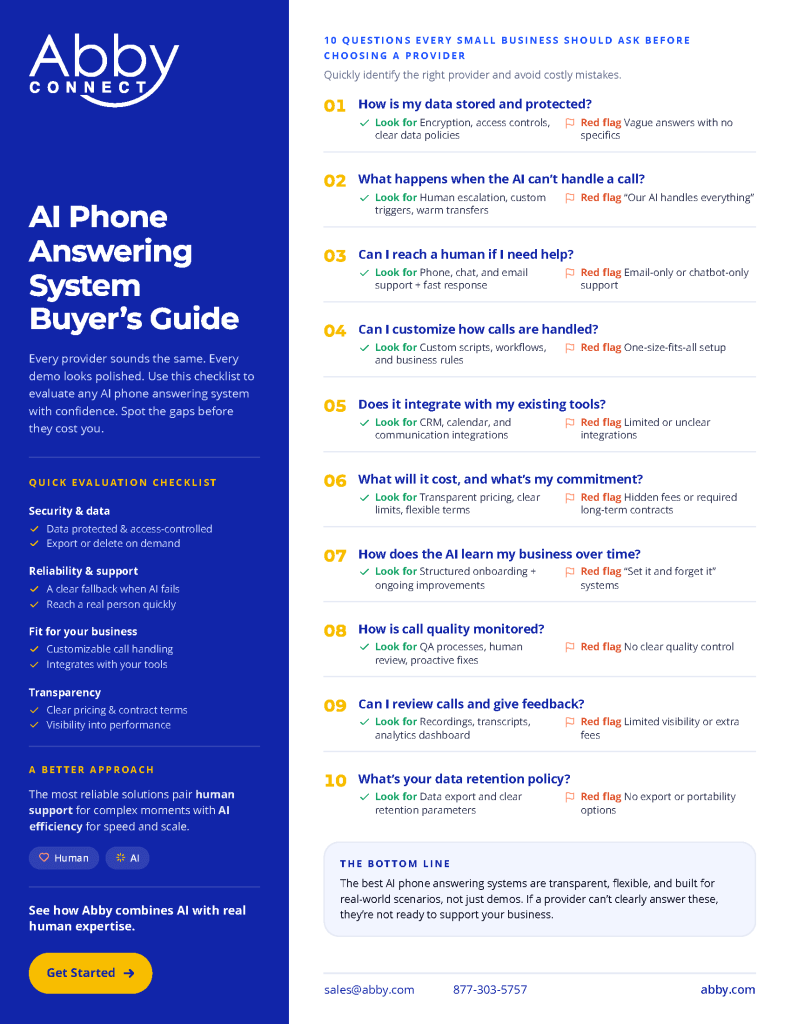
When comparing AI solutions, make sure you have clarity on:
Security & Privacy
- Does the provider clearly explain data storage and encryption?
- Is the data retention policy clearly documented?
- Can you export your data if you leave?
Human Support & Escalation
- Is there a clear escalation path to humans when the AI can’t handle a call?
- Can YOU reach a human when you need support?
- Are there multiple support channels (not just email)?
Functionality & Customization
- Can you customize scripts and workflows for your specific business?
- Does it integrate with your calendar, CRM, and other tools?
- Is the onboarding process clearly defined with human support?
- Is there a mechanism for the AI to improve over time?
Quality & Transparency
- Does the provider have an active QA process?
- Do you have access to call recordings and analytics?
- Can you easily provide feedback and request changes?
Costs & Commitment
- Is pricing clear with no hidden fees?
- Are contract terms flexible?
- Is the cancellation policy reasonable?
The Bottom Line
The AI phone answering service providers who answer these 10 questions clearly and confidently are the ones worth your time.
The ones who get vague, defensive, or redirect to a sales call? That tells you something too.
You’re trusting this system with your customers’ first impression of your business.
Don’t choose based on the best pitch.
Choose based on the best answers.
See the Difference for Yourself
At Abby Connect, AI isn’t a replacement for people; it’s built on top of decades of real receptionist experience.
That means:
- Reliable human backup when AI reaches its limits
- Real support when you need help
- A system designed for how businesses actually operate
Want to see what that looks like in practice?
Talk to our team to see Abby’s AI phone answering system in action.
Start your 14 day free trial with Abby AI Receptionist today. Experience how the right system improves efficiency and captures more opportunities.
Capture more leads. Save time. Deliver better service. Never miss an opportunity.